Keep building on a local workspace, with clearer workflows and fewer repeated steps.
03 / ROOM TO REACH FURTHER
The vision · Built with intentionKeep your feet local.
Let your ambitions soar.
The next chapter is yours to imagine. Our ambition is a calmer, more capable workspace that gives realtors more room for the people and possibilities ahead.
Join the launch list Talk to Olvu.
Explore the Olvu idea
Platform testing, publisher signing and independent reviews remain release work, not completed certifications.
Share a question or an idea with Olvu. Future features will be identified as plans, not promises.
Olvu Desk is in private development. The stars are an invitation to imagine, not a promise of business results. Optional cloud access is part of the longer-term vision; the current focus is the local realtor workspace.
02 / A WIDER PERSPECTIVE
One space for your real estate daySee the connections.
Find your next move.
A conversation becomes a follow-up. A listing becomes a campaign. The details that used to live in separate places begin to tell one useful story.
Explore the Olvu idea
Contacts, dated notes, call logs and follow-ups help you pick up where you left off.
Turn saved listing details and chosen photos into editable emails and marketing creatives.
Bring appointments, tasks and reviewed campaigns into the same everyday workspace.
These workflows are part of the current local product. Email, calendar and publishing capabilities depend on compatible providers, permissions and setup.
01 / ABOVE THE EVERYDAY
Local. Private. Yours to build on.Dream ahead.
Stay grounded in what matters.
Imagine a real estate day with less searching and more purpose. Your relationships. Your work. A thoughtful local CRM built specifically for realtors.
Explore the Olvu idea
Your saved CRM workspace lives on your computer and carries across sessions.
Choose your connections. Connected services receive the information needed for the features you use.
Review controls, contact permissions and optional authenticator protection support deliberate work.
Local storage still needs device protection and reliable backups. Olvu’s database is not yet fully encrypted.
ABOVE THE WATERFRONTThe same sky. A little more possibility. ↑

Local. Private. Built for realtors.
Real estate.
Beautifully together.
A local CRM built specifically for realtors — one connected workspace, on your computer.
In private development. Thoughtfully built for your daily work.
YOUR WORK. YOUR COMPUTER. YOUR NEXT CHAPTER.
One space.
Your whole real estate day.
Private by intention. Local by design. Built to make the day easier.
Explore your data & safeguardsPeopleRemember the relationship
→PropertiesBring the details together
→CampaignsCreate, then review
→Next stepsKeep the momentum
YOUR WORK. ONE BEAUTIFUL DESK.ACTUAL PRODUCT PREVIEW
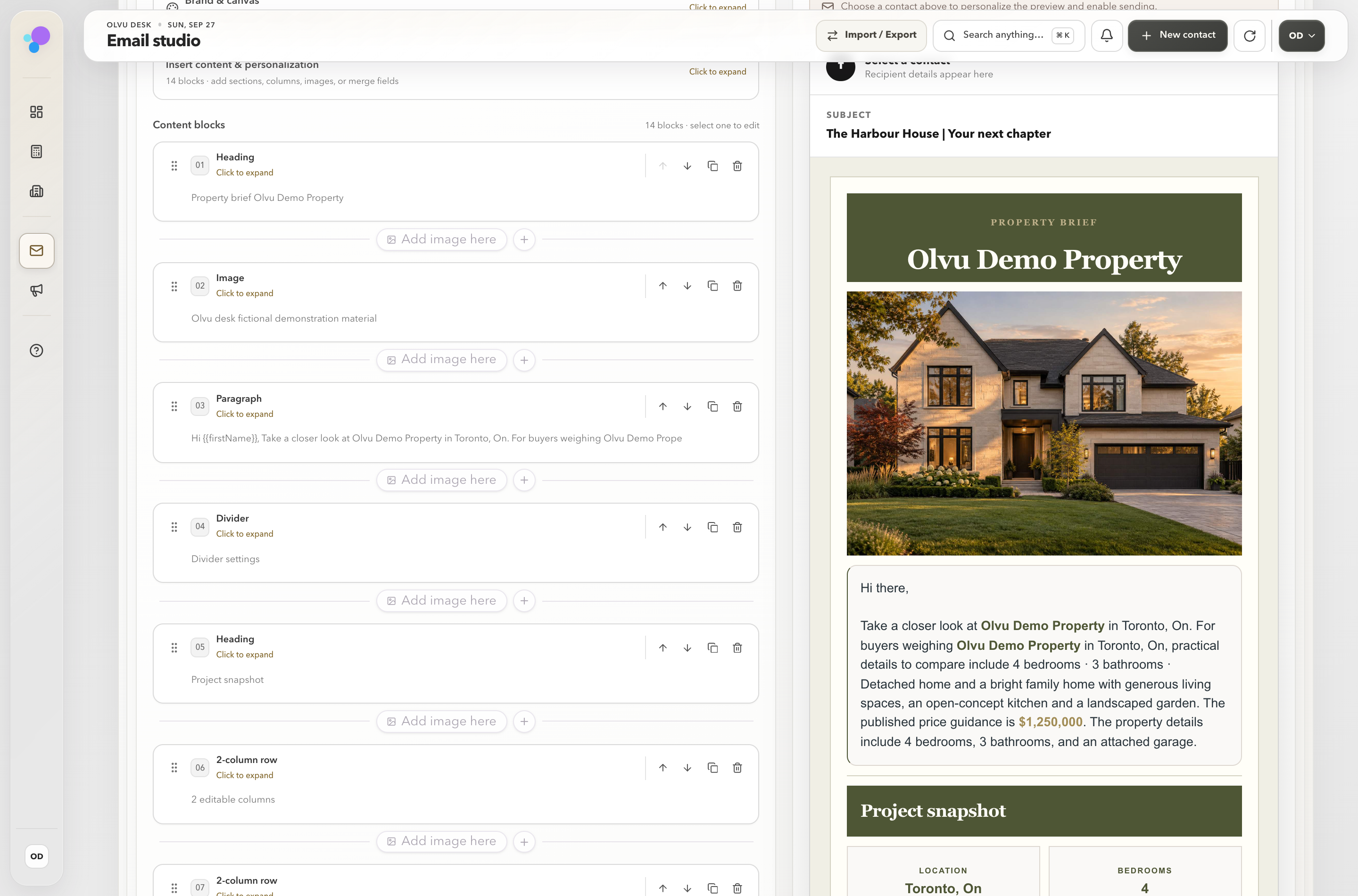
Turn property materials into a designed email. Refine it, preview it and review before sending.
Your day. Your private desk.Relationships, follow-ups and next steps, together.
Real product screens. Example workspace. No client contacts.
A place for every part of your day
Contacts · Listings · Email · Calendar · Follow-ups
REAL WORKFLOWS. BEAUTIFULLY CLEAR.
Less figuring it out.
More getting it done.
See the work come together: polished emails, clear calculations and a calmer day. Three short looks inside the actual product, using no client contacts and fictional property materials.
LOCAL WORKSPACE · ZERO CONTACTS
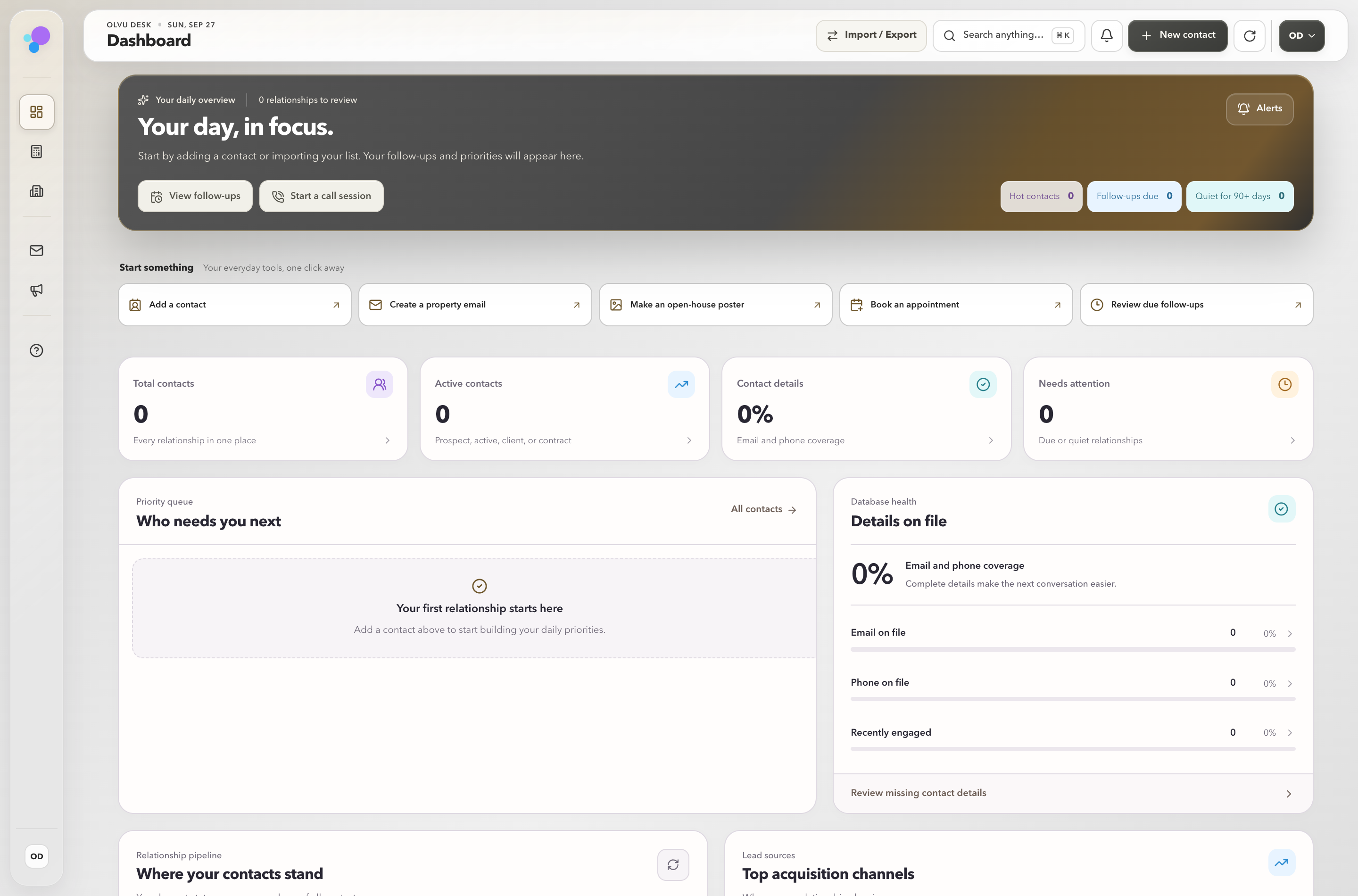
03 / YOUR DAILY DESK
A private home for the day ahead.
A calm starting point for the day ahead. See follow-ups, next steps and your relationship pipeline together, in a clean demonstration workspace. Your real client records never appear in these films.
Read the walkthrough
LOCAL WORKSPACE · ZERO CONTACTS
01 / PROPERTY EMAILS
A beautiful email, from the facts you supply.
Start with your property materials. Make the resulting email your own, refine the wording and check its mobile and desktop presentation. This design was built in Olvu from a fictional brochure; nothing is sent in the film.
Read the walkthrough
LOCAL WORKSPACE · ZERO CONTACTS
02 / REALTOR CALCULATORS
Bring clarity to the conversation.
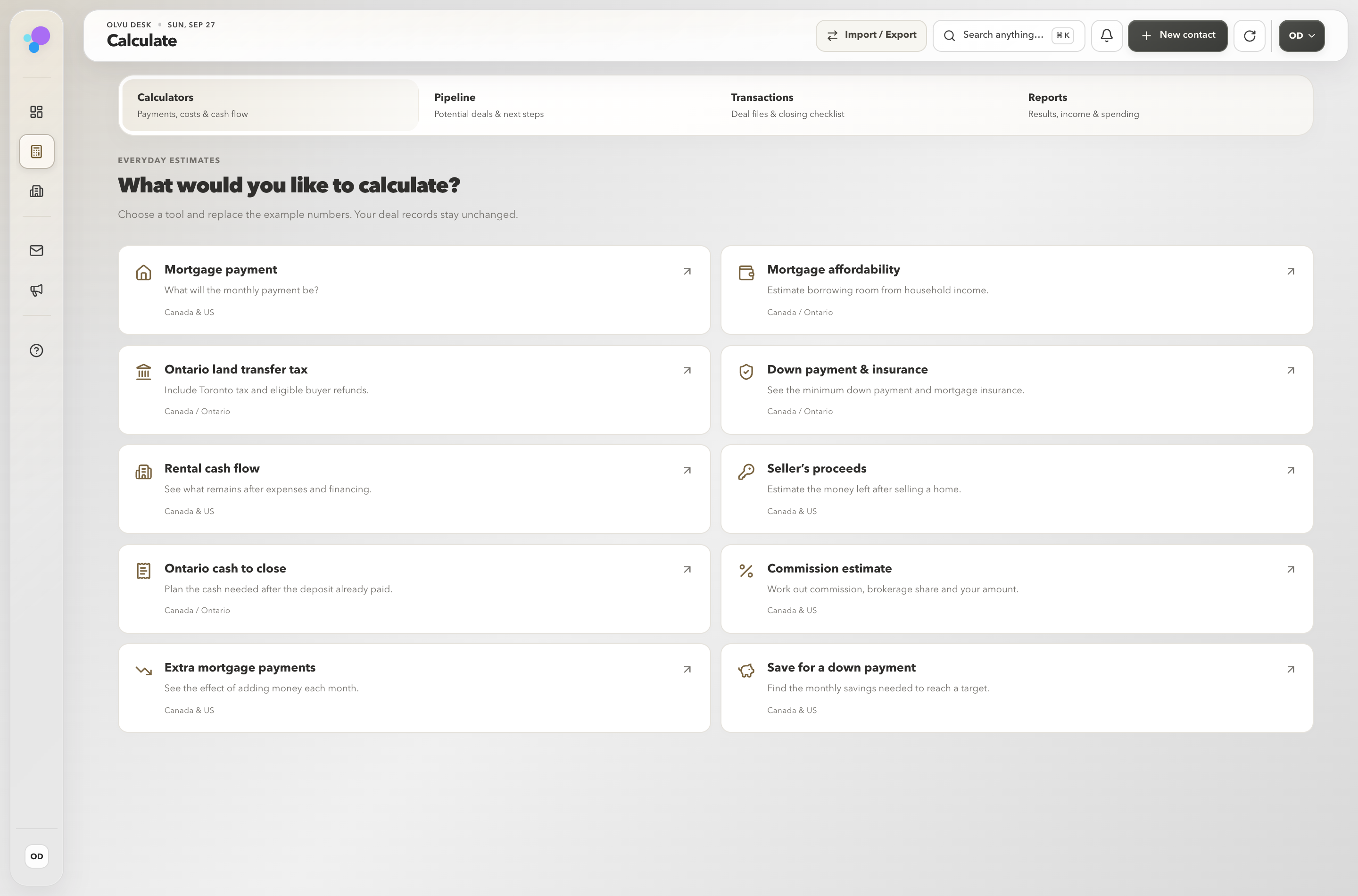
Explore ten calculators, including mortgage payments, Ontario land transfer tax, cash to close and rental cash flow. Change the inputs and see the result update. Estimates include assumptions and source links; they are not approvals or professional advice.
Read the walkthrough
300+built-in help answers
2,000+searchable question phrasings
10practical calculators
Your design.Individual email exports, in colour
THE PROPERTY CAMPAIGN GENERATOR
One folder.
A beautiful
first impression.
Turn property materials from a shared Google Drive folder into a designed email draft—with photos, details and your signature brought together.
No external AI API required for the core campaign generator. Use a public sharing link or upload your documents, review the result, and make it yours.
Choose a shared Google Drive folder or upload your property documents. Olvu uses the materials you provide.
FROM THE ACTUAL OLVU WORKSPACEYOUR SOURCE MATERIALS
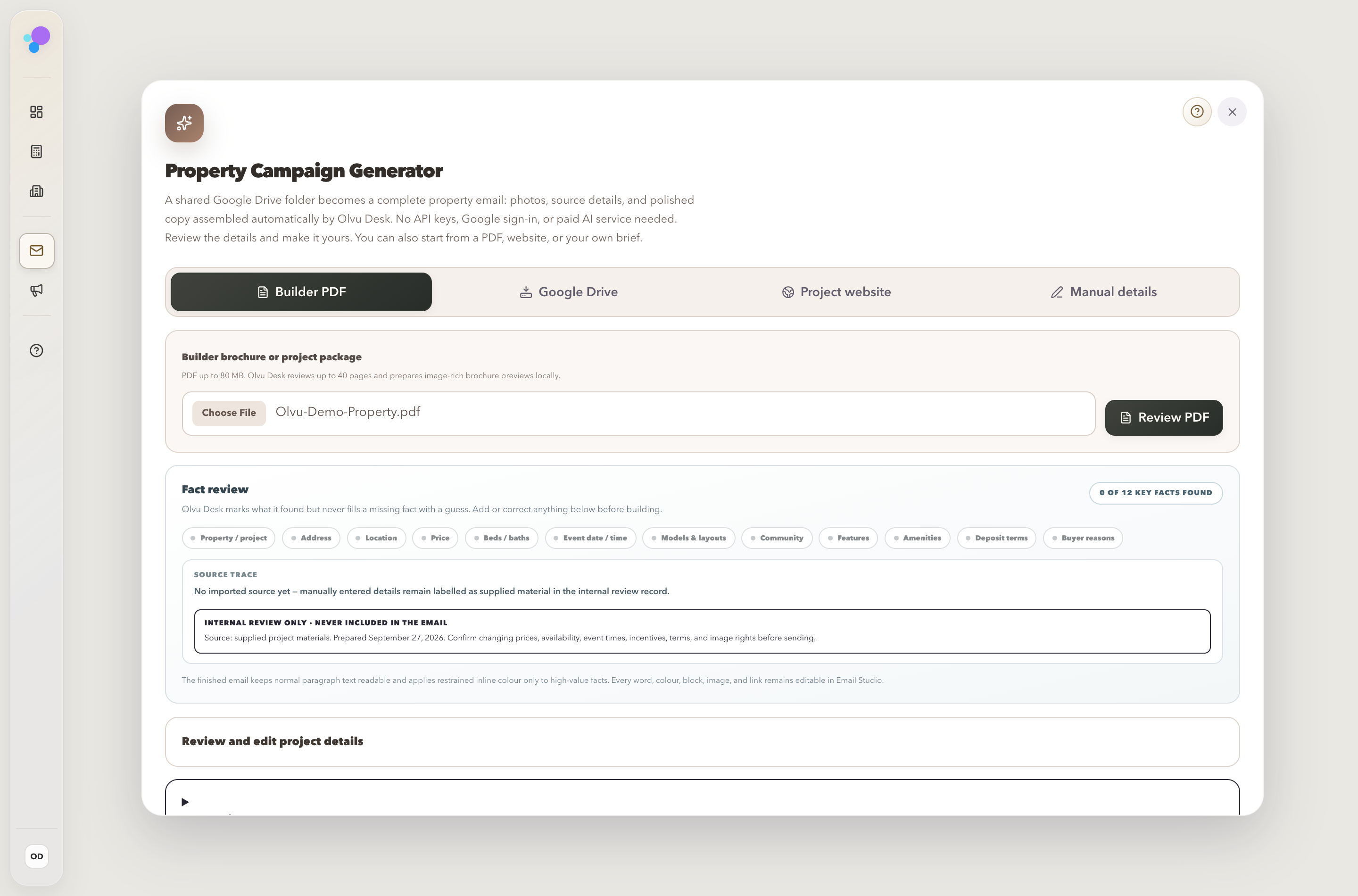
Begin with the property materials you already have.
Your editor and preview sit together. Change a detail and check the result.
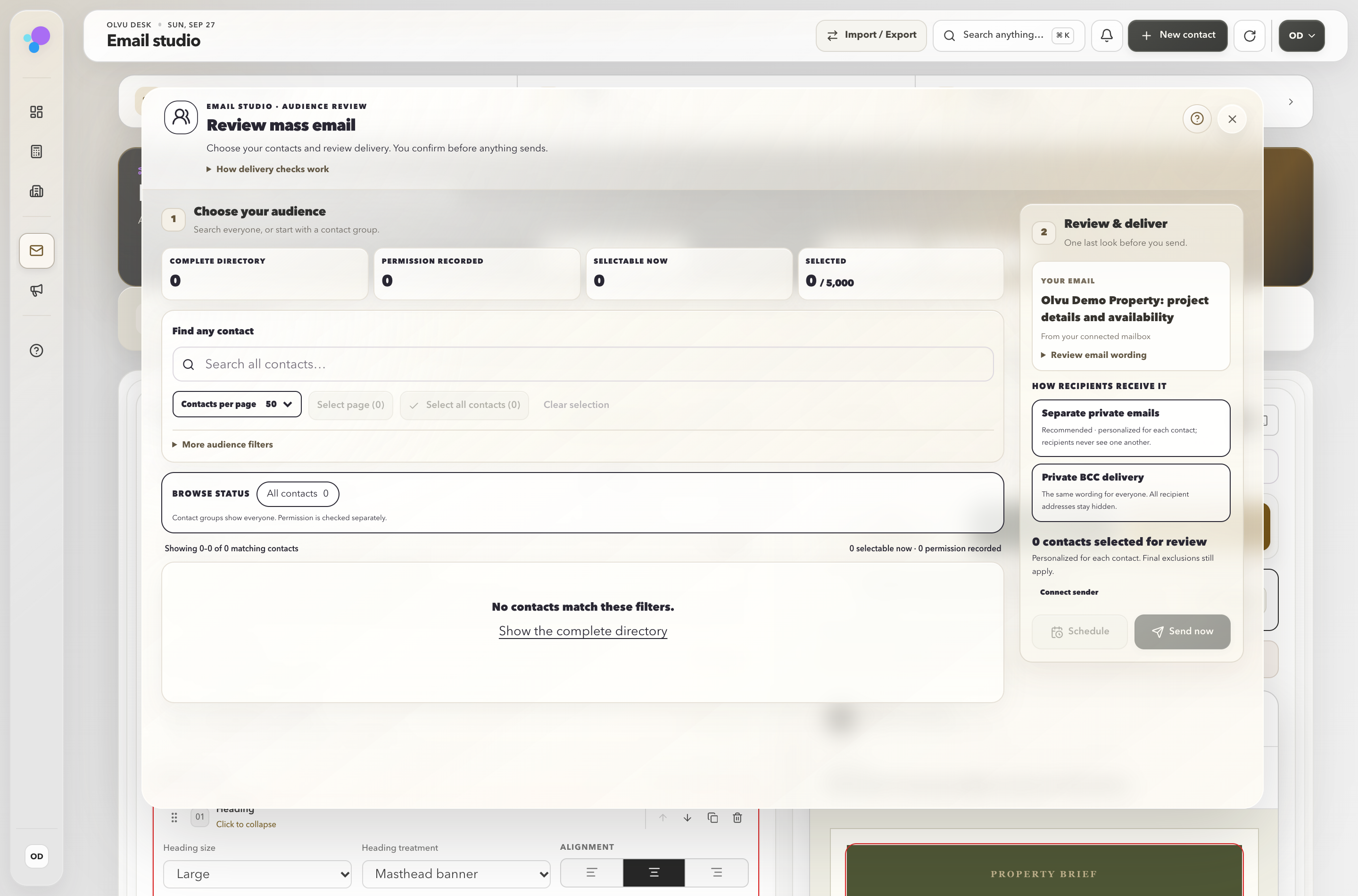
Choose the audience, check permission, and confirm the final delivery.
Actual workspace screens · zero contacts · fictional property materials
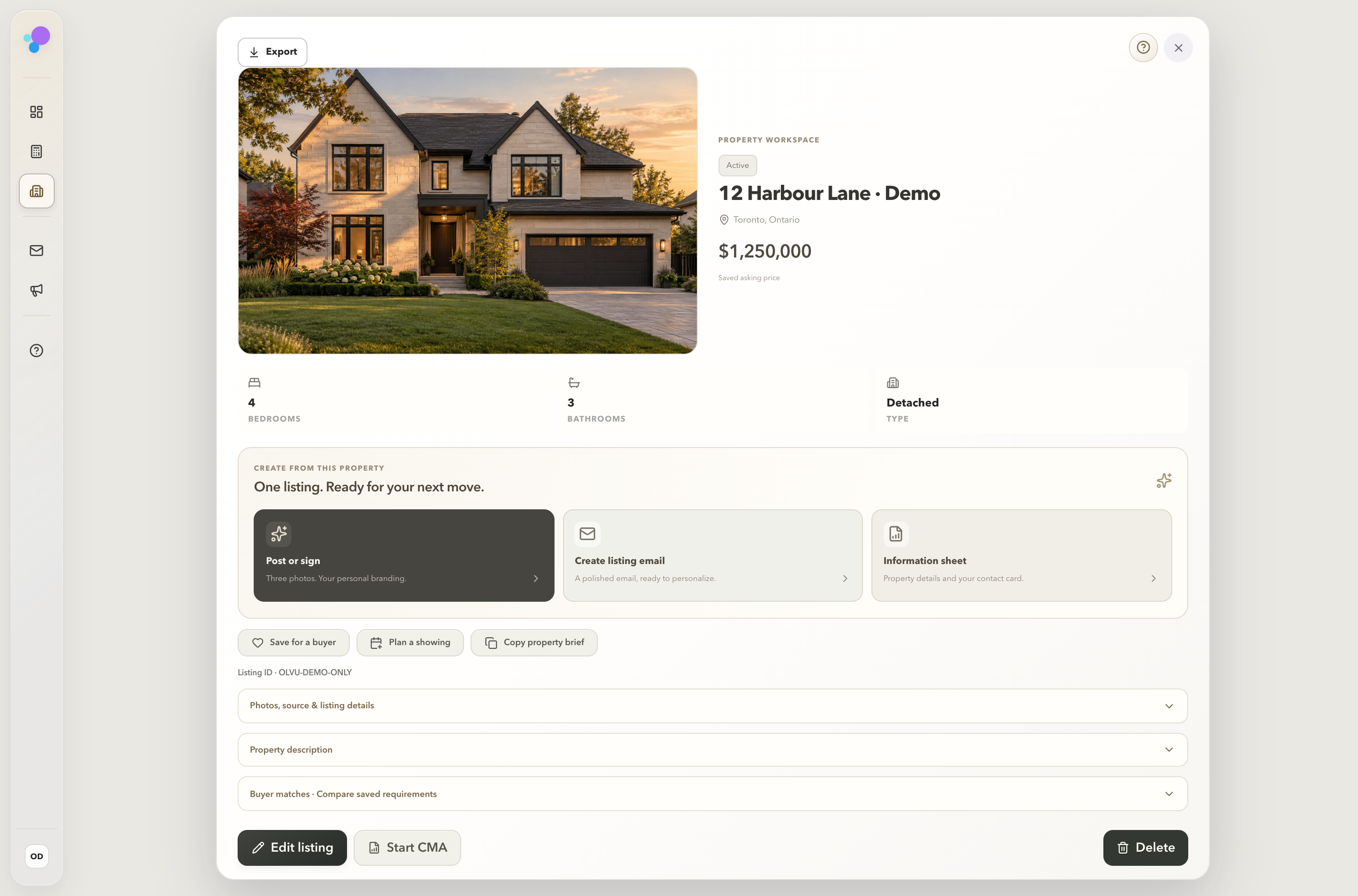
Actual property workspace · facts, photos and next steps together.
FROM LISTING TO LASTING IMPRESSION
More possibilities.
Less starting over.
Give each property its own workspace. Keep the facts and photos together, prepare a listing email and plan the next showing from the same place.
- Keep property facts and photos together
- Prepare a listing email or information sheet
- Plan a showing and save the next step
- Review source details before sharing
BUILT AROUND THE WORK YOU ACTUALLY DO
The details matter.
So does your time.
Clear controls, thoughtful layouts and useful tools. Start with one task and find your next step.
01 / CONTACTSA relationship, not a row.Contact history, notes, calls, email activity and follow-ups stay together. Expand a contact for more room, search their history, and correct or remove a saved entry.Remember the context
02 / LISTINGSOne property. A full story.Keep property facts and photos in one place. Turn a saved listing into a campaign, open house poster, for-sale announcement or sold and leased creative.Build from what you already have
03 / EMAIL STUDIOBuilt-in intelligence. Your final touch.Turn property materials into a designed email with the built-in builder. Refine the wording and layout, add your saved signature, then review the audience and delivery.The core generator needs no AI API key
04 / EMAIL AGENTYour inbox, with a little help.Work with supported mailboxes, prepare replies and choose review-and-send or configured auto-send. Connection readiness and sending permissions still matter.Choose how the agent helps
05 / CALCULATORSMake the numbers clearer.Explore mortgage payments, Ontario land transfer tax, cash to close and rental cash flow. Adjust the inputs and compare planning estimates in your workspace.Ten practical realtor calculators
06 / CALENDARSee the next step coming.Appointments, follow-ups and scheduled work share a calendar. Connect Google to bring events in and sync supported appointments and follow-ups back.A connected account is required
07 / CALL PLANNERA clear reason to call.Prepare a useful call list, review calling permission, record the outcome and keep the next action close to the conversation.Less searching before the call
08 / BUILT-IN HELPFind your next step.Ask how to make a property email, prepare an open house poster or back up your workspace. Clear, built-in answers help you get back to your work.300+ answers, already in your desk
A LITTLE GUIDANCE GOES A LONG WAY
Make yourself
at home.
A little setup, clear starting points and help when you need it. Make the workspace feel familiar, one task at a time.
01Make the desk yours.+
Add your realtor details, brokerage and saved signature. Choose your appearance and connect the services you want to use.
02Bring your relationships along.+
Import a contact spreadsheet and review the preview before adding it. Existing records and saved opt-outs are preserved; an import never grants permission to contact someone.
03Give one property a story.+
Start with a saved listing or property materials. Make a campaign or post, choose photos and a design, then review the property details before sharing.
04Keep the next step close.+
Save a note, plan a call or book a follow-up. Your local workspace keeps your work between sessions. Scheduled jobs need the app or local service to be running.
PRIVATE. LOCAL. SAFE. INTELLIGENT.
Your desk.
Your decisions.
Care in the details, clarity in the controls. Olvu brings practical intelligence to everyday work while keeping the important choices with you.
Private. Your own workspace.
Your saved CRM lives on your computer, separate from this public website. Email, calendar and publishing connections still use their chosen providers.
Local. Your work stays with you.
Keep contacts, notes, drafts and preferences between sessions. Back up your workspace regularly and keep a recovery copy outside the computer.
Safe. Practical safeguards.
Optional authenticator sign-in, recovery codes and review steps support careful work. The contact database is not yet fully encrypted; device protection and backups still matter.
Intelligent. A better first draft.
The built-in email builder assembles a property campaign from your materials without an external AI API key. Refine the design, verify the facts and review the audience before sending.
THOUGHTFULLY, FROM THE START
The practical details.
Clearly explained.
Starting locally, staying in control,
and growing with Olvu.
What is Olvu Desk?
Olvu Desk is a real estate workspace that brings contacts, listings, email, follow-ups and marketing tools together. Real Estate OS is our way of describing one connected place for your daily work.
Do I stay in control of what gets sent?
Yes. You can review drafts before sending and choose the email agent’s mode. Automated sending requires your setup and permissions; creating a campaign doesn’t publish or send it.
Does the campaign generator need an AI API?
The core Property Campaign Generator assembles email drafts from your property materials without an external AI API. Shared Google Drive links must allow viewing; private materials can be uploaded instead. Downloads need an internet connection. Optional writing features may have separate requirements.
Can I use my current email and calendar?
Olvu includes setup paths for Google, Microsoft and supported mail servers, with Google Calendar syncing. Availability depends on your provider, account permissions and connection setup.
What do I need to use the local app?
The current local release is being developed for Windows and macOS. You open your workspace through its local launcher or localhost browser address. Your data stays in its saved workspace between sessions. Internet access is needed for provider connections, shared Drive materials and online delivery; local scheduled work needs the app or service running. Final supported versions and installer verification will be published with the release.
Can every social account publish automatically?
No. Direct publishing depends on the platform, the type of content, the connected business account and its permissions. Eligible Facebook Page drafts have a review-and-publish path. Some designs or channels use a download-and-share workflow. Meta authorization and real-account acceptance are separate from a connection screen; universal production support is not promised.
Will a REALTOR.ca link keep every listing current?
A saved public link is a useful source, not a live MLS feed. Automatic feed access needs the correct MLS/DDF authorization. Review the source and refresh the property information before marketing. A missing or unavailable listing must not be assumed sold.
Is this a hosted subscription or team product?
Olvu starts with a local workspace on your computer. Our longer-term direction includes optional cloud access, alongside continued improvements for realtors. Cloud access is a future plan, not an available service. Sending a contact request does not create an account, start a subscription or charge you.
Is Olvu Desk available to everyone?
Olvu Desk is currently in private development. Use the contact form below to ask about availability or share a question. Sending a request does not create an account or subscribe you to marketing emails.
YOUR NEXT CHAPTER STARTS HERE
Your next chapter.
A better desk.
Interested in Olvu Desk? Leave your details to ask about the product, its availability or a feature you’d love to see. This requests a personal reply, not a marketing subscription.
01 / WHY OLVU
Good software should feel easy to use.
Clear choices. Useful previews. Details kept together. Olvu puts care into the everyday work, so you can spend less time finding your way and more time helping people.
Quality in the details.
Keep the person, property and next step in context. Saved templates, consistent layouts and editable drafts help you prepare work you can make your own.
An easier way through the day.
Choose a task, follow a guided starting point and review the result. Familiar controls and built-in help keep the next step close to hand.
Intelligence with a purpose.
The built-in email builder turns property documents and photos into an editable campaign. The core generator needs no external AI API key; you review the facts, design and recipients.
OLVU DESK / ACTUAL WORKSPACE
A PRACTICAL WAY FORWARD
Private. Local. Safe. Intelligent.
- 01
Private
Your saved CRM workspace is separate from this public website. Connected services use their own providers and permissions.
- 02
Local
Contacts, notes and drafts stay in the workspace on your computer between sessions. Keep a backup outside the device.
- 03
Safe
Optional authenticator sign-in, recovery codes and review steps support careful work. Full contact-database encryption remains release work.
- 04
Intelligent
Start a property email from your own materials, then refine the wording and layout. Creating a draft does not send it.
02 / LOCAL DATA
Know where your work lives.
Olvu Desk runs on your computer and opens through its local launcher. Contacts, notes and drafts stay in that workspace between sessions, separate from this public website. Online connections still use their chosen providers.
Saved between sessions.
Contacts, notes, drafts and preferences belong to the saved local workspace. Closing a browser tab does not erase them. Keep verified backups and a recovery copy outside the computer.
Connect with a clear purpose.
Email, calendar, shared Drive materials and publishing use online services when you connect or request them. Those providers handle the information needed for the task; local storage does not make connected work offline.
Stronger sign-in, when enabled.
Authenticator protection, recovery codes and session controls are available. Provider secrets and protected backups have encryption safeguards separate from the contact database.
OLVU DESK / ACTUAL WORKSPACE
A PRACTICAL WAY FORWARD
Clear controls. Clear limits.
- 01
Protect access
Use the available sign-in controls and keep your recovery codes somewhere safe.
- 02
Keep a recovery copy
Back up the saved workspace before moving computers or making major changes.
- 03
Review what you add
Preview imports before adding them, and keep your saved workspace organized.
- 04
Know what is unfinished
Full contact-database encryption, signed installers and independent security review remain release work.
03 / YOUR DAY
Less searching. More useful conversations.
Start with what matters to the client. The workspace helps you find the context, prepare the next conversation and keep the follow-through close at hand.
People with a history.
Expand a contact to review details, notes, calls, email activity and upcoming follow-ups. Search the saved history and correct or remove an entry when needed.
Replies with your voice.
Prepare an email reply and refine the wording before it goes out. Review-and-send and configured email automation remain choices you control, with account setup and sending permissions required.
A place for the next step.
Plan a call, record its outcome, book an appointment or save a follow-up. Google Calendar can bring events in and sync supported appointments and follow-ups back when connected.
OLVU DESK / ACTUAL WORKSPACE
A PRACTICAL WAY FORWARD
A working day, thoughtfully arranged.
- 01
Before the conversation
Open the contact and review the information you already have.
- 02
During the work
Save the useful detail, prepare the email or plan the next call.
- 03
Before reaching out
Check the contact details, calling or sending permission and the final wording.
- 04
Afterwards
Record the outcome and book the follow-up while the context is fresh.
04 / MARKETING
Built-in intelligence. A draft you can shape.
The Property Campaign Generator does the assembly: it turns shared property materials or uploaded documents into an email draft. You choose the photos, refine the wording and preview the result before delivery.
A useful draft, already assembled.
The core email builder uses your materials without an external AI API key or paid AI writing service. Shared Drive links need viewing access and internet; private materials can be uploaded instead.
Make the presentation yours.
Choose property photos, adjust the arrangement and colours, refine the copy and bring along the realtor identity saved in your workspace. Your facts and final design stay reviewable.
More ways to introduce a property.
Create property emails, listing posts, open house posters, for-sale announcements and sold or leased creatives. Save the work, review publishing options or download an assisted design to share.
OLVU DESK / ACTUAL WORKSPACE
A PRACTICAL WAY FORWARD
Materials in. Your judgment throughout.
- 01
Bring the source
Choose a saved listing, a public Drive link or supported uploaded materials.
- 02
Build the story
Create the draft, select photos and add your saved signature.
- 03
Refine the details
Confirm pricing, status, dates, property facts and permission to use the material.
- 04
Choose the delivery
Preview the campaign, review the audience and use a supported sending or publishing path.
05 / EVERYDAY TOOLS
Useful answers, where you work.
Check an estimate, look up a workflow or find the next step without leaving your local workspace. Olvu brings practical calculators and a searchable help library into the real estate day.
Ten practical calculators.
Explore mortgage payments, Ontario land transfer tax, cash to close and rental cash flow. Change the inputs and see the estimate update.
Built-in answers, easy to find.
Search more than 300 saved help answers through over 2,000 question phrasings. Find practical steps for email, posters, backups and everyday work.
Understand the next step.
Use the calculator assumptions and source links to understand an estimate. The local help library explains saved workflows without needing a paid chatbot.
OLVU DESK / ACTUAL WORKSPACE
A PRACTICAL WAY FORWARD
From a question to a useful next step.
- 01
Choose the task
Open the calculator you need or search the built-in help in your own words.
- 02
Add your context
Replace example calculator inputs with the figures you want to explore.
- 03
Read the explanation
Review the estimate, its assumptions and linked sources, or follow the saved help steps.
- 04
Keep the work moving
Bring the result back to the conversation or continue the workflow with clearer context.
06 / OUR VISION
Keep building around the realtor’s day.
Olvu Desk brings the daily work into one local workspace. Our vision is to keep improving it, add useful features and make more room for the people and properties that need your attention. Optional cloud access is a future plan, not an available service.
A local foundation.
The current private preview brings together contacts and history, property workspaces, email campaigns, social creatives, calendar tools, calculators and built-in help. Your saved workspace lives on your computer.
Useful growth, step by step.
We want to expand Olvu Desk around the everyday work of a realtor: clearer workflows, fewer repeated steps and practical tools that make the day easier. Future features will be described as they take shape.
Local now. Cloud in the future.
Optional cloud access is part of the longer-term vision. It is planned, not available today. Hosted accounts, team management and subscription billing remain future work; no cloud launch date or pricing is announced.
OLVU DESK / ACTUAL WORKSPACE
A PRACTICAL WAY FORWARD
A vision grounded in everyday work.
- 01
Strengthen the local desk
Keep testing daily workflows, saved workspaces, accessibility and performance.
- 02
Expand what is useful
Build on the tools already here, with the aim of making more of a realtor’s day simpler.
- 03
Complete release readiness
Finish installation, upgrade, signing, encryption and independent review work before claiming those milestones.
- 04
Explore optional cloud access
Develop the future cloud direction carefully and share confirmed capabilities and availability as they become ready.